Your Agent Reads 150,000 Tokens Before It Sees the Request
Connect a dozen MCP servers to an agent and you pay for every tool definition on every turn, before the user has said a word. Here is why tool-calling bloats context and how the code execution pattern cuts it by orders of magnitude.
 Viral RuparelNo. 5 of 7010 min read
An agent boots up. It has a Google Drive server, a Salesforce server, a Slack server, a Postgres server, and a couple of internal tools wired in over MCP. Between them that is maybe forty tools. Before the user types a single character, the model is already holding every one of those tool definitions in its context: the names, the descriptions, the full JSON schema for every parameter. On a tool-heavy setup that is well over a hundred thousand tokens of overhead, paid on every turn, most of it describing tools this particular request will never touch.
This is the quiet tax on agents that nobody budgets for. You measure the cost of the model, the cost of your prompts, the cost of the responses. The tool definitions sit in a blind spot, and they scale with how many integrations you add, not with how much work the agent does.
The business problem: you pay for capability you do not use
The appeal of MCP is that connecting a new tool is cheap, which is what the MCP tools specification was built for. Point the agent at another server, and now it can read Drive, or query the warehouse, or post to Slack. So teams connect a lot of them, which is exactly the point. Then the token bill climbs and nobody can quite explain why, because the requests look small.
The cost shows up in two places, and both are easy to miss.
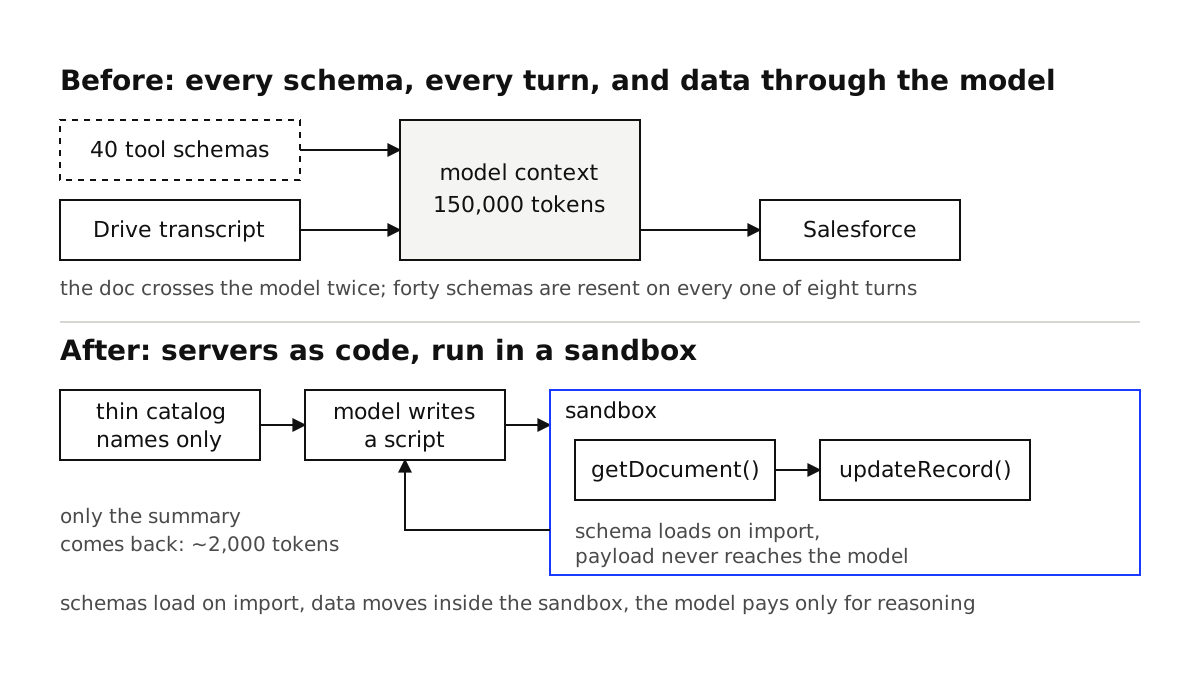
The first is the definitions themselves. Every connected tool contributes its full schema to context on every turn. Forty tools with rich descriptions and nested parameter schemas is not unusual, and that block of text is resent with each step of a multi-step task. An agent that takes eight turns to finish a job pays for those definitions eight times. None of that spend moved the task forward.
The second is worse because it scales with your data, not your tool count. Watch what happens when an agent chains two tools. It pulls a document out of Drive, then writes it into Salesforce. The tool-calling loop routes that document through the model twice: once as the output of the read, and once as the input you feed to the write. For a two-hour sales call transcript, that round trip can be fifty thousand tokens of content the model does not need to read, it just needs to move it from one place to another.
Add those up across a busy agent and the number gets absurd. Anthropic's own writeup on this walks through a workflow that ran about 150,000 tokens under the naive approach and 2,000 tokens under the pattern below. That is not a tuning win, that is a different order of magnitude, and it comes almost entirely from not making the model hold things it has no reason to hold.
Why tool calling bloats context by design
The standard tool-calling loop has one mental model: the model sees a menu of every tool, picks one, gets the result back into context, and repeats. It is a clean abstraction and it works fine at small scale. It falls apart on exactly the two axes above.
It bloats up front because the menu is always fully expanded. There is no notion of "show me the tools when I need them." Every option is on the table at all times, so the model reads the whole catalog to use one item from it.
It bloats in the middle because every intermediate result is forced through the context window. The model is the only thing that can hold state between tool calls, so anything one tool produces and the next tool consumes has to become tokens the model reads and then re-emits. The model becomes a very expensive pipe.
Both problems have the same root cause. The model is doing work that is not reasoning. Selecting from a static list and shuttling data between tools are mechanical jobs, and we are paying frontier-model token rates to do them.
The pattern: expose MCP servers as code, not as a menu
The fix is to stop treating tools as a menu the model picks from and start treating them as a code API the model programs against. Instead of forty tool definitions in context, you give the model a sandbox and a set of importable modules, one per server, and let it write a short script that calls exactly the tools it needs.
Concretely, you present each MCP server as a small filesystem of typed functions:
servers/
  google-drive/
    getDocument.ts
    listFiles.ts
  salesforce/
    query.ts
    updateRecord.ts
  slack/
    postMessage.ts
The model does not load all of that. It sees the shape of what is available and writes code against the pieces it decides to use. The Drive-to-Salesforce task that cost fifty thousand tokens of transcript shuttling becomes a few lines:
// The model writes and runs this in the sandbox. The transcript is fetched,
// held in a local variable, and written straight back out. It never becomes
// tokens the model has to read, because the model is not the one moving it.
import { getDocument } from "./servers/google-drive/getDocument";
import { updateRecord } from "./servers/salesforce/updateRecord";

const { content } = await getDocument({ documentId: "abc123" });

await updateRecord({
  objectType: "SalesMeeting",
  data: { Notes: content },
});
The transcript flows from Drive to Salesforce inside the sandbox. The model wrote the plumbing, but the payload never entered its context. That single change is where most of the token savings live, because the biggest line items in a tool-heavy agent are almost always the intermediate results, not the reasoning.
Filtering before data reaches the model
Once the model is writing code, filtering stops being a special feature and becomes ordinary programming. The classic failure mode is a tool that returns four thousand rows when the task needs one number. In a tool-calling loop, all four thousand rows land in context and the model reads them to compute a sum it could have computed in one line.
In the code pattern, you compute the sum in one line:
import { query } from "./servers/salesforce/query";

const rows = await query({
  soql: "SELECT Amount FROM Opportunity WHERE StageName = 'Closed Won'",
});

// 4,000 rows stay in the sandbox. Only the summary crosses back to the model.
const total = rows.reduce((sum, row) => sum + row.Amount, 0);
console.log(`Closed-won pipeline: ${rows.length} deals, $${total.toLocaleString()}`);
The model gets back one sentence instead of a spreadsheet. This is the same instinct behind good context compaction for long-running agents: the cheapest token is the one you never put in the window. Here you are applying it at the tool boundary instead of the history boundary, but it is the same discipline. Keep bulk data out, let only the distilled result through. The same compression boundary shows up when a subagent reports back to a parent, and it needs the same care: a return contract for subagent results so the one fact that mattered does not get filtered out with the noise.
It also handles control flow for free. Loops, retries, and conditionals that would each have cost a full model turn in a tool-calling loop now run as plain code. An agent that needs to check ten records and act on the three that match no longer takes ten round trips through the model. It takes one script.
Progressive disclosure: load the schema when you need it
The last piece attacks the up-front definition bloat. You do not have to describe forty tools to a model to let it use forty tools. You describe a lightweight index, and let the model pull the full schema for a tool only when it decides to call that tool.
// The model reads this thin catalog, not forty full schemas. It costs a few
// hundred tokens instead of a hundred thousand. When the model picks a tool,
// the sandbox resolves the real typed signature from disk on import.
export const catalog = {
  "google-drive": ["getDocument", "listFiles"],
  salesforce: ["query", "updateRecord"],
  slack: ["postMessage"],
};
The model scans the catalog, decides it needs salesforce/query, and imports it. Only then does the detailed schema for that one function enter play, resolved at import time in the sandbox rather than preloaded into context. Adding a fiftieth server costs you one more line in the catalog, not another schema dumped into every prompt. This is the difference between overhead that scales with tools connected and overhead that scales with tools used, and on a growing agent that difference compounds.
There is a privacy dividend too. Because the data stays in the sandbox, sensitive fields never have to pass through the model at all. If a record contains a customer's email and phone number and the task only needs their account status, the model can be handed the status and nothing else. The PII stays inside the execution environment, which is a much easier privacy story to defend than "we send everything to the model and trust it not to leak."
The tradeoffs nobody mentions
You are now running model-generated code, so you need a real sandbox. This is the big one. A tool-calling loop executes your code with the model's arguments. This pattern executes the model's code. That is a genuinely different security posture, and eval in your main process is not the answer. You need an isolated environment with no ambient credentials, tight resource limits, and a locked-down network. If you are not prepared to run untrusted code safely, do not adopt this pattern, because the whole thing rests on that sandbox being sound.
Debugging moves from tool calls to generated scripts. When a tool-calling agent misbehaves, you read a clean list of calls and arguments. When a code-execution agent misbehaves, you read a script it wrote, which can be wrong in more interesting ways than picking the wrong tool. You will want the sandbox to log every script it runs, so a failure gives you the exact code to reproduce rather than a vague "the agent did something odd."
A model that writes buggy code fails where a fixed schema would not. Structured tool calls are constrained. Generated code is not, so the model can produce a script that throws, loops badly, or misreads a return type. Capture errors and feed them back so the model can correct, and keep the exposed function signatures boringly simple, because the simpler the API the less the model can get wrong. The discipline is the same one you need for classifying and recovering from tool call failures, just applied to a script instead of a schema.
It is overkill below a certain size. If your agent has three tools and returns small payloads, the plain tool-calling loop is fine and the sandbox is complexity you do not need. This pattern earns its keep when you have many tools, large intermediate results, or multi-step workflows that currently take a lot of round trips. Match the machinery to the problem. The same way you would not route every request to your biggest model, you should not reach for a sandbox to run a three-tool agent.
The takeaway
The default way of connecting tools to an agent has the model hold a full catalog of definitions on every turn and act as the pipe for every byte of data that moves between tools. Both costs scale with things that have nothing to do with the actual work, which is why tool-heavy agents get expensive in ways that are hard to trace back to a cause.
The code execution pattern fixes both. Expose servers as importable modules so tool definitions load on demand instead of all at once. Let the model write short scripts that call tools, filter results, and handle control flow in the sandbox, so bulk data and mechanical loops never touch the context window. The reported swing from 150,000 tokens to 2,000 on a real workflow is what happens when you stop paying a frontier model to do filing and shuttling.
Pay for reasoning. Do not pay for the model to read a tool menu it half ignores, or to carry a transcript from one drawer to another. That is not what it is good at, and it is not what you should be spending your token budget on.
If your agent's token bill has crept up as you have added integrations and you cannot pin down where it is going, book a consultation call and we will find out how much of it is real work and how much is overhead.
Questions this essay answers
01Why do MCP tool definitions cost so many tokens?
Because every connected tool's name, description, and full input schema is loaded into the model's context on every single turn, whether or not the turn uses it. Connect a handful of MCP servers with a few dozen tools between them and the definitions alone can run to tens or hundreds of thousands of tokens, all paid for before the user's request is even read.
02What is the code execution pattern for MCP?
Instead of exposing MCP tools as direct function calls the model picks from a giant menu, you expose each server as a code API the model can import and call inside a sandbox. The model writes a short script that calls the tools it needs, processes the results in code, and returns only the filtered output. Tool definitions load on demand and large intermediate results never pass through the context window.
03How much can code execution with MCP actually save?
Anthropic's own example reports a workflow dropping from about 150,000 tokens to 2,000, a saving near 99 percent, by loading only the tools it needed and filtering data in the sandbox instead of routing it through the model. Real savings depend on how many tools you have connected and how large your intermediate results are, but on tool-heavy agents the reduction is large enough to change what is affordable to run.
04What are the downsides of the code execution pattern?
You need a real sandbox to run model-generated code safely, which is more infrastructure than a plain tool-calling loop. Debugging shifts from reading tool calls to reading generated scripts, and a model that writes buggy code fails in ways a fixed tool schema would not. It is worth it for agents with many tools or large data payloads, and overkill for an agent with three tools and small responses.