Your Model Advertises 1M Tokens. It Starts Forgetting Around 600K.
A million-token context window landed in half the models this week, and the reflex is to stop retrieving and just paste everything in. The window is real.
 Viral RuparelNo. 38 of 7410 min read
Half the frontier models shipped a one-million-token context window this month, and one of them cut prompt cache reads by seventy-five percent on top of it. The moment that lands, someone on your team is going to open a pull request that deletes the retrieval layer and pastes the entire knowledge base into the system prompt. Why maintain a vector store and a reranker when the model will just read all of it?
Because the window is real and the quality across all of it is not. A model that accepts a million tokens does not reason equally well over a million tokens. It will happily take the input, return an answer, throw no error, and be quietly wrong about the thing you buried on line 40,000. You will pay full price for every one of those tokens on every turn, and the failure will not show up in your logs. It shows up in a support ticket three weeks later that you cannot reproduce.
This is the trap of a bigger window: it moves a hard, visible limit (the request errors out) into a soft, invisible one (the answer gets worse and nothing tells you). Below is how to see that limit for your model and your task, and how to spend the window on purpose instead of filling it.
The business problem: you pay linearly, quality does not scale linearly
Two numbers move in opposite directions as you grow the prompt, and that gap is the whole problem.
Cost is linear and merciless. You pay for input tokens on every request, and in an agent loop every turn resends the accumulated context. A 200K-token prompt is not a one-time 200K charge. It is 200K on this turn, 200K on the next, and again on the one after that. Push that to 800K because the window now allows it and you have not made the agent smarter, you have multiplied the bill on every single step. In-context "memory" that holds tens of thousands of facts can cost dollars per query where a retrieval call over the same corpus costs fractions of a cent, because retrieval sends a few thousand tokens and stuffing sends all of them. This gets worse now that MCP servers are meant to be stateless, because any state the server used to hold between calls now has to travel in the request.
Quality is not linear. Every model degrades as input grows, which Chroma's context rot study measured across eighteen models, and the degradation is worst in the middle. A fact sitting at the start or the very end of a long prompt gets recalled well. The same fact at forty percent depth in an 800K-token context can get missed entirely. This is the lost-in-the-middle effect, and it does not politely announce itself. The model returns a confident, well-formatted answer that happens to ignore the source you paid to include.
So the two curves cross. Past some length, every extra token you add costs money and lowers the odds the model uses the tokens that actually matter. The job is to find where that crossover is for your setup and stay on the good side of it. One caution before you trust the number: the budget is measured in tokens, and the tokenizer is part of the model, so a model swap can shift the token count of the same text and quietly move your budget line without any change to the content.
Step one: measure your effective context, do not trust the spec
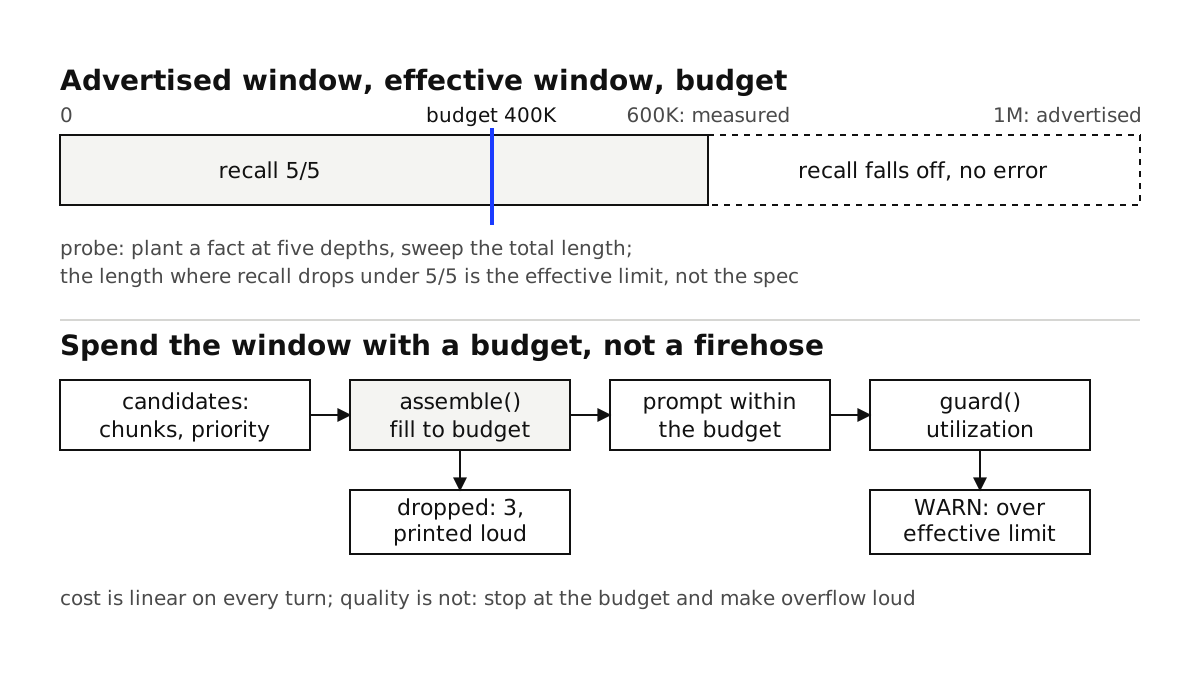
The advertised window is a number the provider enforces. The effective window is a number you have to find. The tool for finding it is a positional recall probe, sometimes called needle-in-a-haystack: plant a specific, checkable fact at a known depth inside a realistic document, pad the total to a target length, and ask the model to retrieve it. Sweep both the depth and the total length, and you get a map of where your model stops paying attention.
# effective_context_probe.py
# Measure where recall falls off for a given model, using a real document as
# filler. Sweep total length x needle depth, then read the curve.
import anthropic

client = anthropic.Anthropic()
MODEL = "claude-sonnet-5"  # swap for the model you actually ship

# A fact the model cannot know from pretraining, so a correct answer proves
# it read your context and did not guess.
NEEDLE = "The internal rollback code for the Meridian deploy is QUARTZ-7788."
QUESTION = "What is the internal rollback code for the Meridian deploy?"

def build_context(filler: str, depth_frac: float, target_tokens: int) -> str:
    # ~4 chars per token is a rough English estimate; use the real tokenizer
    # for anything you report as a hard number.
    target_chars = target_tokens * 4
    body = (filler * (target_chars // len(filler) + 1))[:target_chars]
    cut = int(len(body) * depth_frac)
    return body[:cut] + "\n\n" + NEEDLE + "\n\n" + body[cut:]

def recalls(context: str) -> bool:
    resp = client.messages.create(
        model=MODEL,
        max_tokens=64,
        messages=[{
            "role": "user",
            "content": f"{context}\n\nAnswer using only the text above.\n{QUESTION}",
        }],
    )
    return "QUARTZ-7788" in resp.content[0].text

filler = open("sample_doc.txt").read()  # any representative long document
for length in [16_000, 64_000, 128_000, 256_000, 512_000, 800_000]:
    hits = sum(recalls(build_context(filler, d, length))
               for d in (0.1, 0.3, 0.5, 0.7, 0.9))
    print(f"{length:>8} tokens: {hits}/5 depths recalled")
Run that against the model you actually deploy, not the biggest one on the pricing page. You will get a curve that holds at 5/5 for a while, then starts dropping, usually well before the advertised ceiling, which is what the RULER benchmark found across models too. The length where it falls below your quality bar (for many teams, anything under 5/5 on a retrieval task is a fail) is your effective context limit. Write that number down. It is the budget you are about to enforce.
One thing worth doing here: run this the same way you would run evals in CI to catch regressions, because the number moves. A model upgrade can raise or lower your effective limit, and you want to find that out in a test, not from a user.
Step two: spend the window with a budget, not a firehose
Once you know the safe ceiling, the assembly of every prompt becomes a budgeting problem, not a "throw it all in" problem. You have candidate content: retrieved chunks, tool outputs, conversation history, the system prompt. Each has a token cost and a priority. You fill the budget by priority and you stop at the ceiling, evicting the least important content instead of overflowing into the region where the model gets sloppy.
# context_budget.py
from dataclasses import dataclass

@dataclass
class Chunk:
    text: str
    tokens: int
    priority: int  # higher = more important; system prompt and the question win

def assemble(chunks: list[Chunk], budget_tokens: int) -> list[Chunk]:
    # Greedy fill by priority, then recency within a priority. Anything that
    # does not fit is dropped on purpose, not silently truncated mid-sentence.
    ordered = sorted(chunks, key=lambda c: c.priority, reverse=True)
    kept, used = [], 0
    for c in ordered:
        if used + c.tokens <= budget_tokens:
            kept.append(c)
            used += c.tokens
    # Report what got left out so it is visible, not a mystery.
    dropped = len(chunks) - len(kept)
    print(f"context: {used}/{budget_tokens} tokens, {len(kept)} kept, {dropped} dropped")
    return kept
The important part is the budget_tokens you pass in. It is not the model's advertised window and it is not even your measured ceiling. It is the ceiling minus room for the output and a safety margin, because the effective limit you measured is where quality starts to slip, not where it collapses. If your probe showed clean recall to 400K, budget to something like 250K to 300K and keep the model in the range where it is strong. The unused 700K of window is not wasted. It is headroom for the rare request that genuinely needs it, and insurance against a prompt you underestimated.
This is the same instinct behind offloading bulky tool output to the filesystem instead of the prompt: the window is a scarce, expensive resource even when the provider tells you it is huge, so you decide what earns a place in it. It is also why a curated playbook of small deltas beats a prompt that grows with every lesson learned: the playbook earns its tokens, the growing prompt just spends them.
Step three: make overflow loud instead of silent
The failure mode you are defending against is silence. A truncation that happens quietly, a chunk that got dropped without anyone knowing, a prompt that crept past the good range over a long session. So put a guard at the boundary where the prompt is finalized, and make it refuse or at least shout.
# context_guard.py
class ContextOverBudget(Exception):
    pass

def guard(total_tokens: int, effective_limit: int, hard_window: int):
    utilization = total_tokens / effective_limit
    if total_tokens > hard_window:
        # This one is a real error: the API will reject it.
        raise ContextOverBudget(
            f"{total_tokens} exceeds hard window {hard_window}")
    if total_tokens > effective_limit:
        # Not an API error, but the danger zone. Log it as a first-class signal
        # so you can see drift toward the cliff before quality drops.
        print(f"WARN context {total_tokens} over effective limit "
              f"{effective_limit} ({utilization:.0%}); expect quality falloff")
    return utilization
Emit that utilization number into your traces alongside latency and cost. Now "we drifted into the degraded zone" is a metric you can alert on, the same way you would watch any other reliability signal. When a long agent run starts creeping toward the limit, the honest fix is usually not a bigger window. It is compacting the history that grew without bound so the window holds the plan and the relevant facts instead of a transcript of everything that ever happened.
Tradeoffs and the places this bites
Retrieval did not become optional, its economics changed. The right read of a 1M window is not "delete the retriever." It is "retrieval now has more headroom for the hard cases." Targeted retrieval that lands a few thousand relevant tokens in the window still beats a hundred-thousand-token dump on the same task, and it is far cheaper. Keep your hybrid search and reranking; the window just means a bad retrieval is less likely to drop the one paragraph you needed.
Your effective limit is per model and per task. A summarization task tolerates length differently than exact-fact retrieval. Measure the shape of work you actually run, and remeasure on every model change. Treating one number as universal is how you get surprised.
Token estimates are not token counts. The four-chars-per-token heuristic in the probe is fine for finding the shape of the curve. It is not fine for a production guard sitting next to a hard API limit. Use the model's real tokenizer for anything you enforce against, or you will trip the ceiling you were trying to avoid.
Cheaper cache reads reward stable prefixes, not bigger dumps. If your model just cut cache-read pricing, the win comes from keeping the front of your prompt byte-identical across calls so it stays cached, which pairs directly with how prefix caching cuts cost and latency. Pasting a giant, ever-changing blob into the window does the opposite: it is expensive and it busts the cache on every turn.
The takeaway
A bigger context window is more room to work, not permission to stop thinking about what goes in the prompt. The advertised million is a ceiling the provider enforces. The number that governs whether your agent is right is the effective context, and you find that by measuring, not by reading the launch post. Probe your model to see where recall falls off, set a token budget below that line, and put a guard at the boundary so overflow is loud instead of silent. Do that and the extra window becomes what it should be: headroom you draw on deliberately, not a bill that grows while your answers quietly get worse.
If your team is about to move to one of this month's big-window models and the plan is to stop retrieving and start stuffing, that is exactly the change that looks free and is not. Book a consultation call and we can measure your real effective context and put a token budget around it before the cost and the quality regression show up in production.
Questions this essay answers
01What is the difference between the advertised context window and the effective context window?
The advertised window is the number of tokens the API will accept in a single request without returning an error. The effective context window is the length past which the model stops using the input reliably: recall of facts buried in the middle drops, instructions get ignored, and answers start contradicting the source. The advertised number is a hard limit the provider enforces. The effective number is a quality cliff you discover yourself, and it is almost always well below the advertised one. A model that accepts 1M tokens often holds high-quality recall to somewhere around half to two-thirds of that before accuracy visibly falls off.
02If I have a 1M-token window, should I stop using retrieval?
No. A bigger window changes the economics of retrieval, it does not remove the reason for it. Stuffing a whole corpus into every request means you pay for those input tokens on every turn and you push the model toward the part of its window where quality degrades. Targeted retrieval that puts a few thousand relevant tokens in the window usually beats a hundred-thousand-token dump on the same task, and it costs a fraction as much. Use the large window as headroom for the cases that genuinely need it, not as an excuse to skip deciding what belongs in the prompt.
03How do I know where my model's effective context limit is?
Measure it, do not trust the spec sheet. Run a positional recall probe: take a real document, insert a specific fact at a known depth, pad the context to a target length, and ask the model to retrieve that fact. Sweep the depth and the total length, and plot recall against both. The length where recall starts dropping below your quality bar is your effective limit for that task and that model. Rerun it whenever you change models, because a model upgrade moves this number.